Schemas Are Dead (Not Really)
Write-Output⌗
Don’t worry, we’ll come back to that title in a bit.
Let’s get some context before diving in. Earlier this month the Logic Apps team released their newest creation - Agent Loop Workflows in Logic Apps Standard. These workflows integrate powerful LLM capabilities into Logic Apps and simplify their extensibility, especially in terms of tooling (LLM tooling paradigms is another blog post worth talking about at a later point, but I digress.)
An Agentic workflow is very similar to your classic Stateful/Stateless workflow, there’s the normal repertoire of connectors, actions, control shapes etc. The key value add is that you’re able to define one or more agent shapes in the workflow, give each of them a repertoire of tools and instructions on how to use them. These agents then process their instructions as part of executing your workflow.
The Agent (in essence a session with the LLM with defined starting conditions and instructions for its behaviour) brings its own native capabilities into the workflow, decision making, translation, summarization and of course parsing. Furthermore, as alluded to above, these intrinsic capabilities can be expanded upon by defining Tools (also sometimes called Plugins, or Assistants) for the Agent. Tools can be anything, like how to call an API, do some basic math, you get the idea.
So this brings us back to our bold opening statement. Have you ever asked ChatGPT (or another model) to parse a CSV? Turns out they’re pretty good at it! Before we go into exploring this point further let’s just take a moment to consider….
The Way Things Were - Flat File Parsing In BizTalk⌗
I’m a veteran of Microsoft BizTalk, csv files were part and parcel of the myriad integrations I used to develop. To parse flat files we would create a dedicated Flat File Schema based on sample messages and specs. This schema would be be utilized as part of a FlatFile Send/Receive pipeline to convert a given flat file into an XML representation. BizTalk’s Flat File parser was very good at its job but not necessarily intuitive:
- Complex flat files could be difficult to write Schemas for. Nested records, repeating record groups, ragged records could all contribute to schema complexity and development effort.
- Parsing a flat file was an all-or-nothing effort. If it failed to parse, the pipeline would throw an exception, a developer would have to play detective at a murder scene with hopefully an Archive copy of the failing file and the Event Log providing clues.
- That said…sometimes a Flat File would parse when you really really wish it had gone bang. Did you miss wrap character protection on a field containing the record delimiter? Congratulations now all the fields in that record row are out by one. This usually comes back to you months later when bad data shows up in your destination system.
Logic Apps didn’t really change this. Flat File schemas used in Integration Accounts or within your Logic App Standard project behave exactly the same way.
A Sample Problem Where The Classics Don’t Quite Cut It⌗
I recently had a customer with an interesting challenge where classical flat file schemas would have struggled.
- They have 40 integration partners who daily provide them 40 different flat files.
- The quality of data in those Flat Files can vary from one day to the next even from the same supplier.
- The schemas for those files are volatile, the suppliers add or remove columns at a whim without forewarning my customer.
- Files must be processed the same day they arrive. There are serious business consequences if they don’t.
- The contents of all files are placed into a Staging table in a SQL Database for data quality curation which is done manually (for now).
As always my first thought would have been to go with the classics, strongly typed schemas with maps to a canonical object we use for a Stored Procedure….but thats 40 flat file schemas and 40 maps
To be fair, I still might consider using strongly typed schemas and traditional mapping techniques but this problem brief prompted me to try some new tools in the toybox as an experiment.
Enter stage left - AI.
Flashback - Integrate London 2023⌗
When between sessions, I remember Mike Stephenson (with a mischievous glint in his eye) asking me if I wanted to see something cool. Naturally I obliged immediately, Mike’s skunkworks projects are always intriguing!
Mike had written a little demo of a natural language map executed by…I want to say Chat GPT 3.5.
No XSLT, no LIQUID. This was a simple set of instructions to an LLM that said how to map data from one format to another.
It was my first experience of seeing an LLM used for…well actual work. It would go on to inspire several of my experiments with Generative AI over the next 2 years - including this one.
Back to the Present⌗
So why not consider I thought to myself. Natural Language “Schemas”.
Which sound far more clever than they actually are.
My first thought had been putting something together with Semantic Kernel (I’ve been playing on and off with it for several months) but coincidentally the Logic Apps Team released Agentic Loop Workflows and I thought it was worth trying them out on this particular problem.
The Plan
-
Define an Agent in a workflow which serves as a point of ingress for data. This agent has one responsibility. Translate the inbound flat file into JSON using the native capabilities of the backing LLM. To assist it, we can give an LLM the “schema” (instructions) on how to read the flat file and tell it to parse it as JSON. Better yet, tell it where to find those instructions, more often than not the Column row is context enough.
-
Define a second agent, this agent is responsible for taking structured JSON and mapping fields from records in that JSON to our stored procedure schema and invoking the stored procedure with those arguments. It would be able to invoke a stored procedure and provide arguments to it because we would extend this agents intrinsic capabilities by defining a Skill
-
????
-
Congratulate myself on feeling rather clever.
Putting It Into Practice With Logic App Standard Agent Loop Workflows⌗
These are the steps I understook to create a very simple prototype of the solution describe above (and its very simple, no bicep, pipelines or the like).
1. Create The Loans Database⌗
This was a Click Ops special, a SQL Azure Database with one Table and a Stored Procedure that takes the LoanID, Balance Outstanding, Payment Date and Payment Amount.
2. Create A Model Deployment in Azure AI Foundry⌗
You’ll need a deployed instance of a model to work with, I used GPT 4.1.
3. Create Your Logic App Standard Project⌗
Ensure you’ve got the latest Logic App Standard extension installed (5.94.20 at time of writing).
-
In Visual Studio Code, create a new Logic App Standard Workspace.
-
Create 2 new workflows, You want them both to be Agent-Loop workflows. In my worked example I named them VolatileFileHandler and VolatileFileWriter.
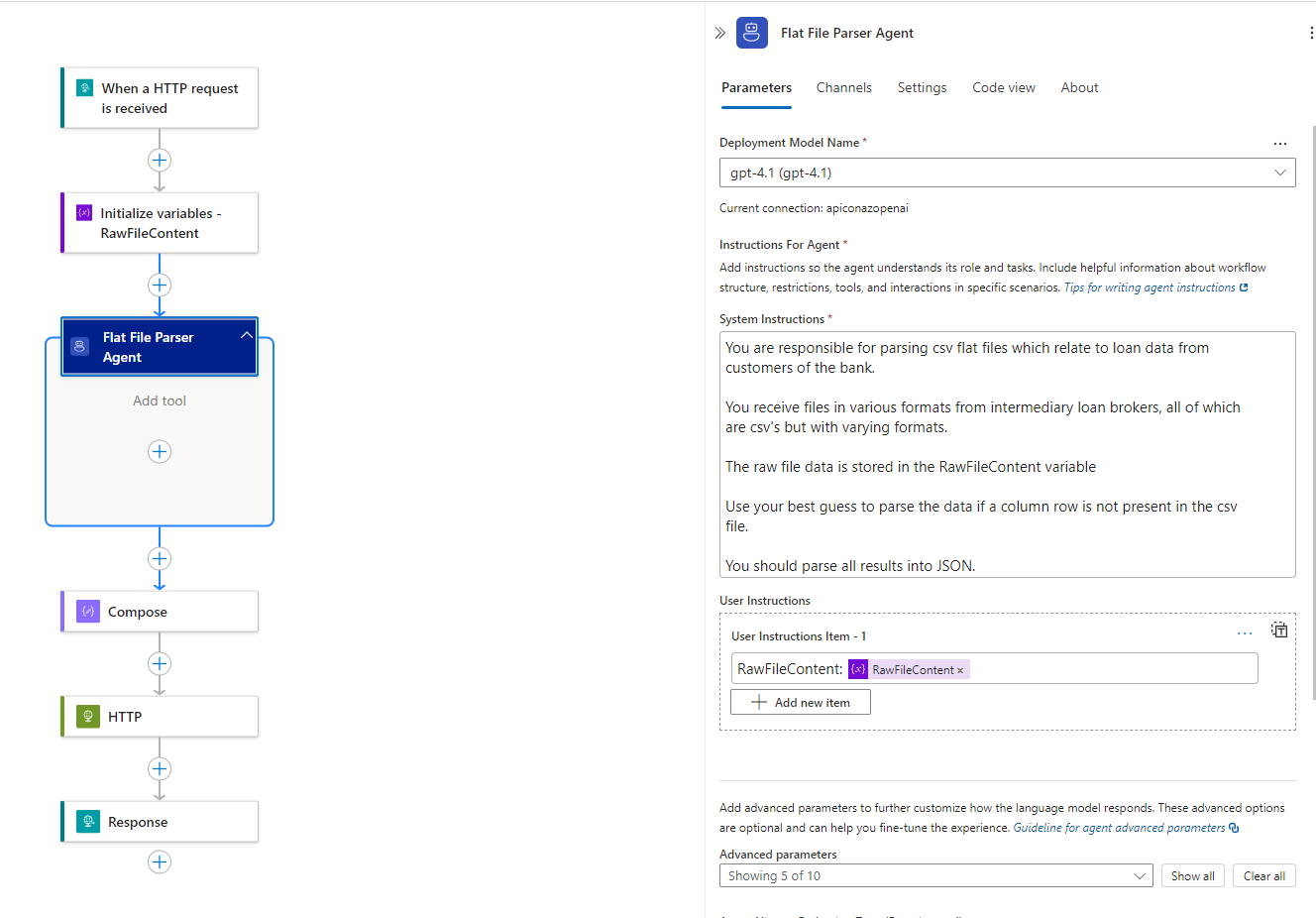
The Volatile Handler Workflow - General Overview And Agent Instructions 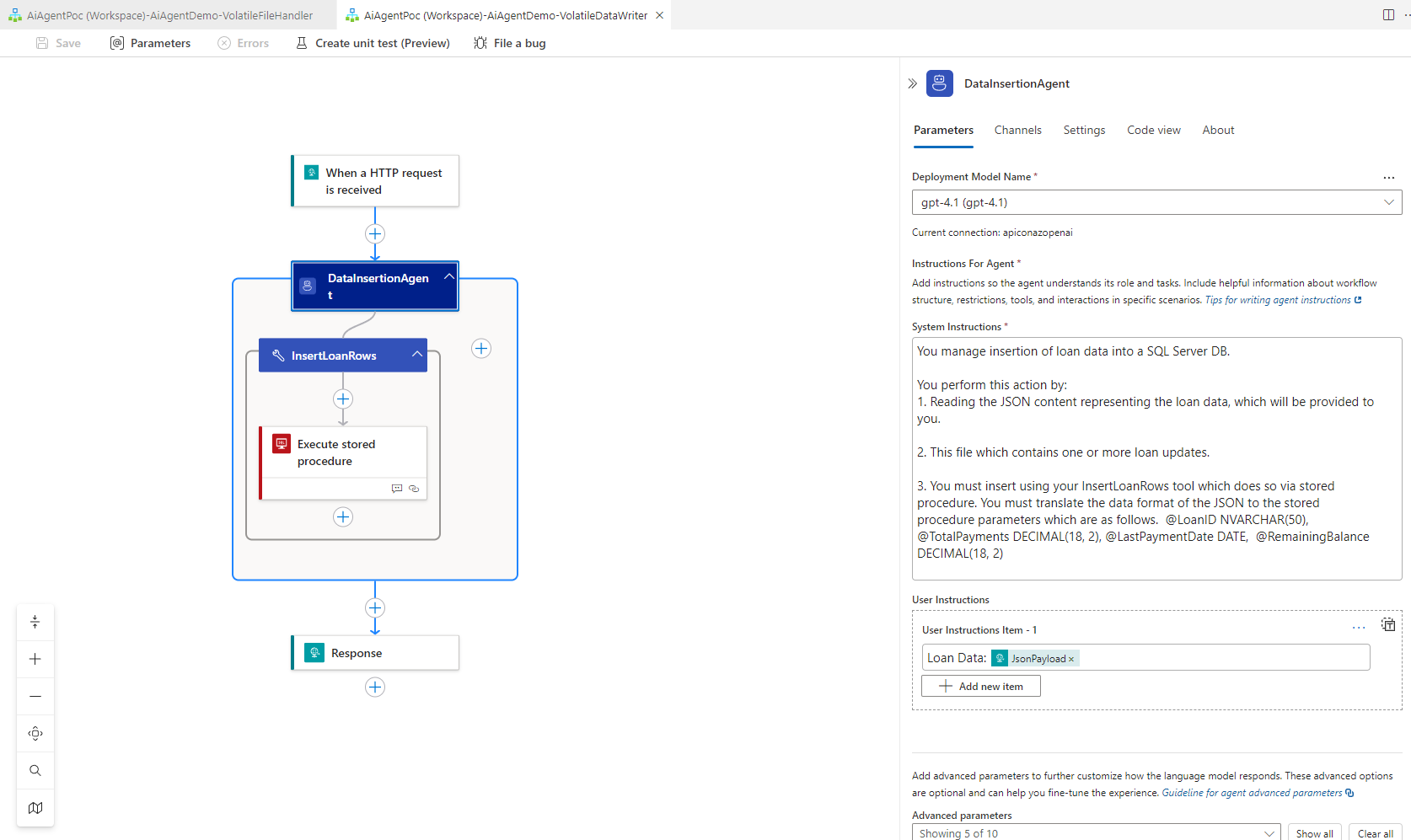
The Volatile Writer Workflow - General Overview and Agent Instructions -
You will note for the VolatileFileWriter we have added a tool, which gives the Agent the capability to call a stored procedure. The tool itself requires a description, as do the parameters for that tool. A short description on how to utilize the tool and about the parameters provide guidance for the Agent on how to invoke the tool correctly.
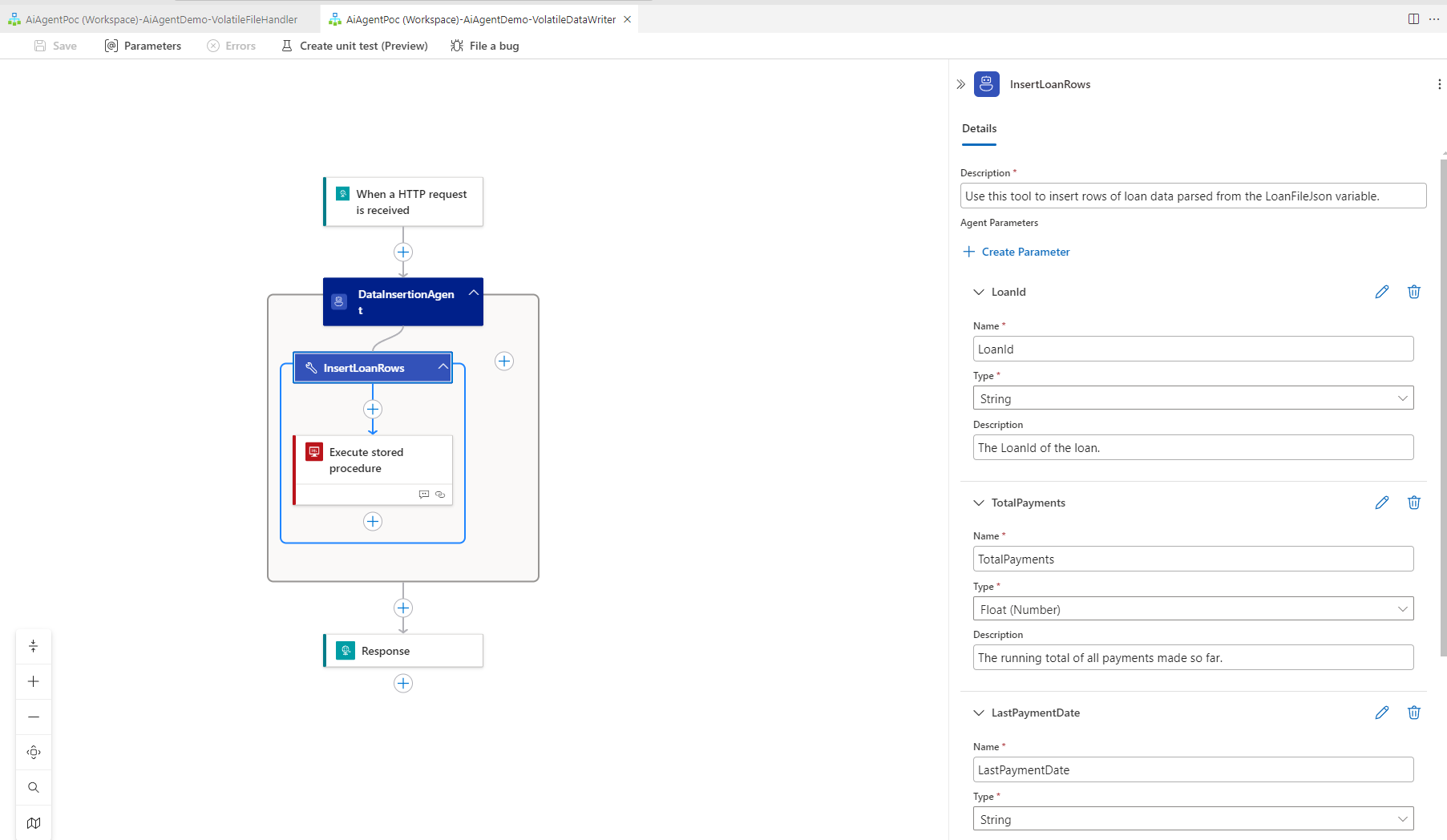
The Volatile Writer Workflow - SQL Stored Procedure Tool Definition -
Once those parameters were defined on the tool we then had to select actions within the tool where those Tool Parameters would be passed. Agentic Parameters are essentially tokens/variables the Agent will provide where instructed to do so with values based on its decision making.
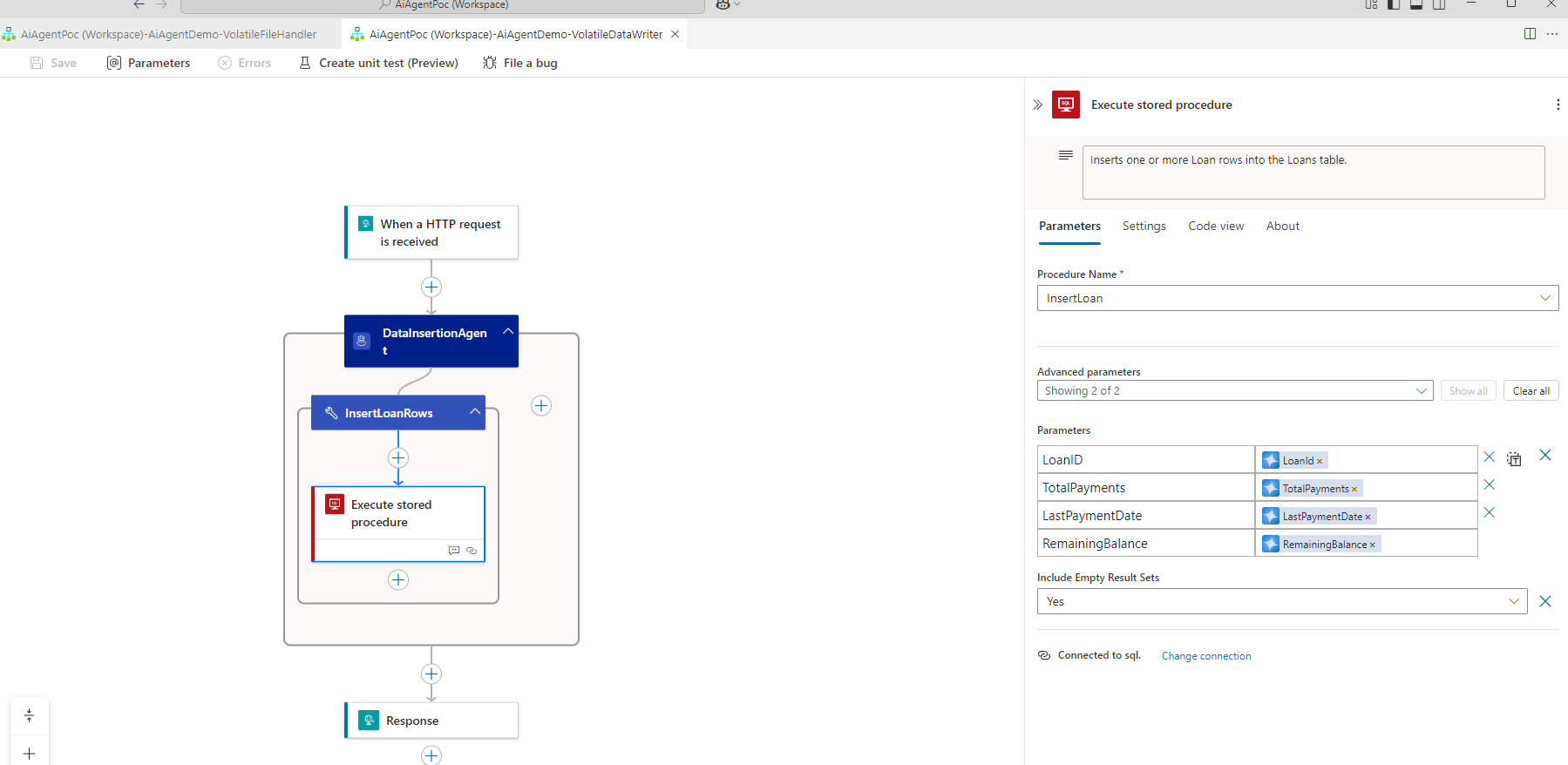
Defining and Binding Agent Parameters in a Tool Declaration
Testing⌗
I wrote a quick little PowerShell Script to test the process, with a variety of Schemas (with different structures) that I could test (in hindsight I should have used REST Client but it did the job well enough).
# Variables
$ApiUrl = "http://localhost:7071/api/VolatileFileHandler/triggers/When_a_HTTP_request_is_received/invoke?api-version=2022-05-01&sp=%2Ftriggers%2FWhen_a_HTTP_request_is_received%2Frun&sv=1.0&sig=fxY8DCQMNqa6L5g2lzIjV1cm790JiFV_H6DG64PhXe0"
#$FilePath = "C:\src\Logic-App-Agent-Loop\AiAgentPoc\AiAgentDemo\TestFiles\StandardSchema\Sample1.txt"
#$FilePath = "C:\src\Logic-App-Agent-Loop\AiAgentPoc\AiAgentDemo\TestFiles\MinimalSchema\MinimalSample1.txt"
#$FilePath = "C:\src\Logic-App-Agent-Loop\AiAgentPoc\AiAgentDemo\TestFiles\ExtendedSchema\ExtendedSample1.txt"
$FilePath = "C:\src\Logic-App-Agent-Loop\AiAgentPoc\AiAgentDemo\TestFiles\AggregatedSchema\AggregatedSample1.txt"
# Base64 encode the file
$EncodedContent = [Convert]::ToBase64String([IO.File]::ReadAllBytes($FilePath))

# Create the JSON payload
$JsonPayload = @{
    RawFileContent = $EncodedContent
} | ConvertTo-Json -Depth 1

# Make the POST request
Invoke-RestMethod -Uri $ApiUrl -Method Post -ContentType "application/json" -Body $JsonPayload
The script simply used Get-Content and some Base64 encoding to send the raw flat file content to the Volatile Handler Logic App using an HTTP Post. Commenting out/in which file was loaded in allowed me to test the integrations with various inputs without over complicating my testing.
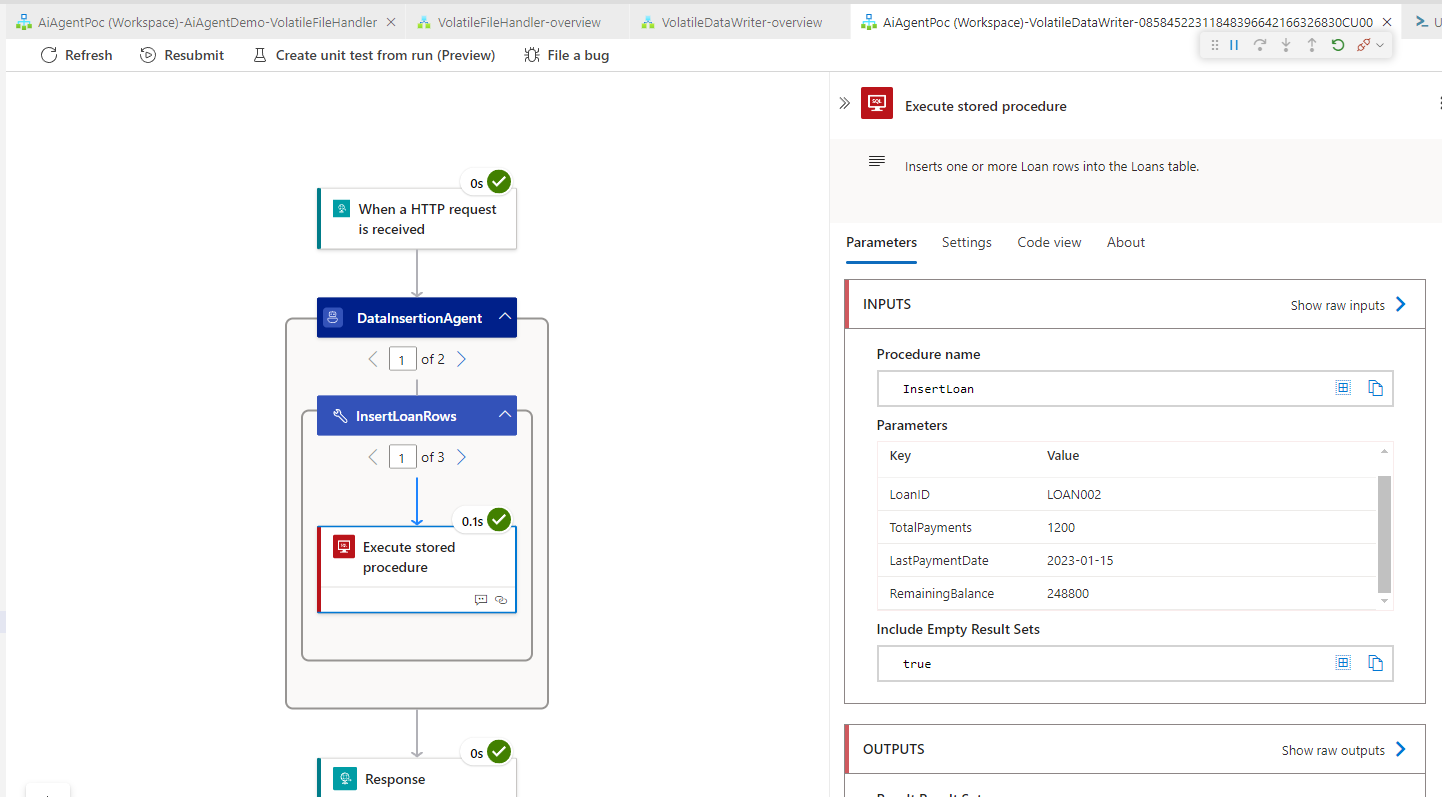
Besides the usual culprits (weird Azurite storage issues, a malformed expression I missed etc etc) it actually worked pretty quickly.
In Conclusion⌗
I tried this solution with 5 different flat files of varying complexity and the Agents worked better than I had expected. My simple Loan table was quickly filled with rows of data with no prompt re-engineering required. It was also very quick to put together, the excellent getting started documentation from the Logic Apps Team was instrumental in hitting the ground quickly.
But we can now come back to our bold opening statement. Schemas are dead!
Well, they’re not really. Strongly typed input contracts, combined with deterministic parsing (and processing when we also talk about Maps) are absolutely still the bread and butter of most integrations you or I will ever write.
But, that said this approach proves that at least when it comes to poorly structured data, Generative AI does have a place in our Integration tool box.
The real question on whether you would use this for a production workload is a pertinent one, I would say yes but definitely not with this specific implementation.
What I’ve demonstrated here is a proof of concept, a mature solution would need:
- Guard rails to protect against hallucinations.
- Prompt engineering to further refine agent behaviour.
- A more thorough consideration of the backing agent model.
- And doubtless many more careful design decisions.
Nonetheless this was a fun exercise, and I got to get some basic familiarity with the tools before the Logic Apps Team blew our socks off with some deep dives at Integrate 2025. I hope that this post inspires you the reader to try Logic Apps Standard Agent Loop workflows, and more importantly that you enjoyed reading it!